

Pop-up dictionary for videos and websites: see what a word means in context
Hover over a word in the subtitles and the video pauses: the InterSub pop-up dictionary shows what the word means in this line, with a context translation of the words around it. On any website, select a word or double-click it, and the same pop-up appears.
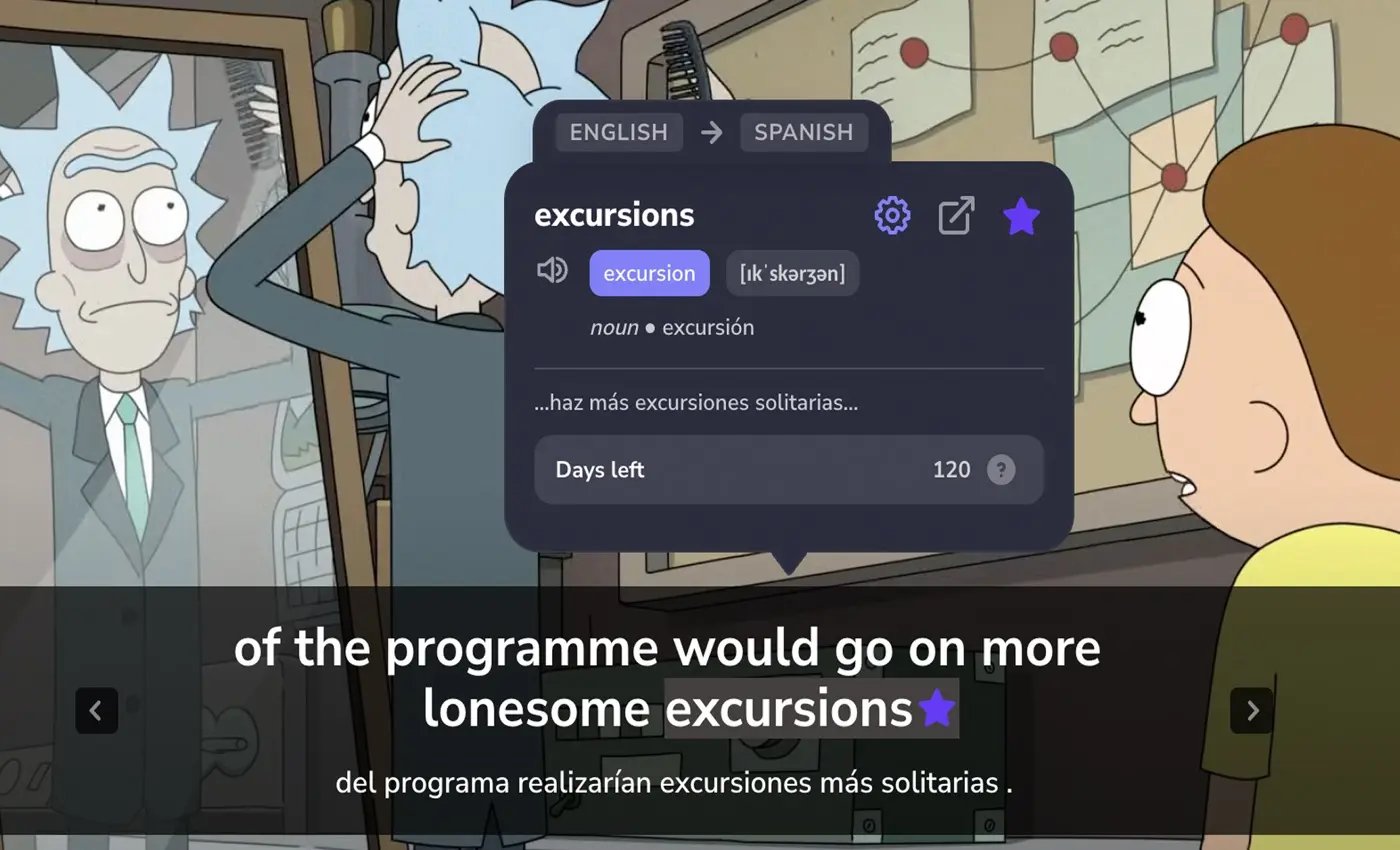
How to use the pop-up dictionary
Install InterSub
Add the free InterSub extension to Google Chrome, Microsoft Edge or Firefox. Links for every browser are on the install page.
Choose your languages
Right after installation InterSub asks which language to translate from and which to translate into. The pop-up translates into the language you choose; dual subtitles are on by default.
Hover or select a word
Play a video with subtitles on YouTube, Netflix, Udemy or another supported platform and hover over a word. On a website, double-click a word or select a phrase.
What you get
The meaning that fits the line. InterSub finds the dictionary form of the word and works out its part of speech from the sentence, so the meaning that fits comes first. Under it, a context translation of about five words on each side shows how the word is used here, slang included.
The video waits for you. Hovering over a word pauses the video; move the cursor away and keep watching. Prefer clicks? In Settings you can switch to selection or double-click and turn hover translation off.
Phrases, idioms and phrasal verbs. The AI recognizes English phrasal verbs, idioms and compound nouns and translates the meaning of the whole phrase, not word by word.
A dictionary extension for every website. Select a word or phrase in an article, a Reddit thread or the comments under a video, and the pop-up shows its translation with the context. You can limit it to sites in the language you learn, so it stays quiet on pages in your native language.
Every word saved for practice. Looked-up words go to your Wordbook with the line they came from, and words from websites keep a link to the page. Train them in Anki or in our Telegram vocabulary trainer.
A whole sentence explained. Need more than a translation? Click the Magic button in the pop-up, and AI Language Buddy explains the word in its context, then the whole sentence, slang and grammar included. See how the AI sentence explainer works.
Dual subtitles, hotkeys, “Show subtitles on pause” and other tools: see all features.
Love the feature! My English is pretty good, but I'm not native, so, sometimes a little help could be handy. The fact that now I can check the translation without distraction is awesome! And it is completely worth the few bucks of a subscription.
Frequently asked questions
Is the pop-up dictionary free?
Yes, within a monthly limit: the free plan includes 15 new word lookups in subtitles and on websites per month and starts with a 14-day Premium trial. Pay-as-you-go packs of 50 to 500 lookups start at $1.49, and Premium with unlimited lookups starts at $6 a month. See plans and prices.
Where does the pop-up dictionary work?
In the subtitles on YouTube, Netflix, Prime Video, HBO Max, Disney+, Crunchyroll, Coursera, Udemy, LinkedIn Learning, TED and the other platforms on the how-to page, and on ordinary websites. It works in Google Chrome, Microsoft Edge and Firefox.
How is it different from a regular dictionary extension?
A regular one usually shows every entry for a word. InterSub puts the meaning that fits the sentence first, adds a context translation of the words around it, pauses the video while you read and keeps the word with its line for practice later.
Can I translate a phrase, not just one word?
Yes. In the subtitles the AI spots phrasal verbs and idioms, like “spell out”, and translates the whole phrase. On a website, select the phrase you need.
Which languages does it translate?
InterSub supports dozens of language pairs, such as English to Spanish, Spanish to English, English to Japanese and German to English. You choose the languages when you install InterSub and can change them later in the extension settings.
More questions about InterSub? See all answers in our FAQ.
Other cases
AI sentence explainer
AI Language Buddy explains a word in context, then the whole sentence, slang and grammar.
AI subtitle translator
No subtitles in your language? Get them translated live while you watch.
Vocabulary trainer
Practice the words you looked up in our Telegram bot, with spaced repetition.
YouTube dual subtitles
Lectures, tutorials and talks on YouTube with two subtitle lines and a pop-up dictionary.
Netflix dual subtitles
Watch Netflix series and films with two subtitle lines and a pop-up dictionary.
LinkedIn Learning dual subtitles
Two subtitle lines for LinkedIn Learning courses, new words in your Wordbook.
Get Started with InterSub
InterSub is a free browser extension for Chrome, Edge and Firefox. Install it today and get a pop-up dictionary for subtitles and websites.