

AI sentence explainer and slang translator, right where you read and watch
Most tools ask you to paste text into a box. AI Language Buddy in InterSub is a sentence explainer that works right where you read or watch: select a word in a subtitle line or on a website, and it explains what the word means in this sentence, then the whole line, slang and grammar included.
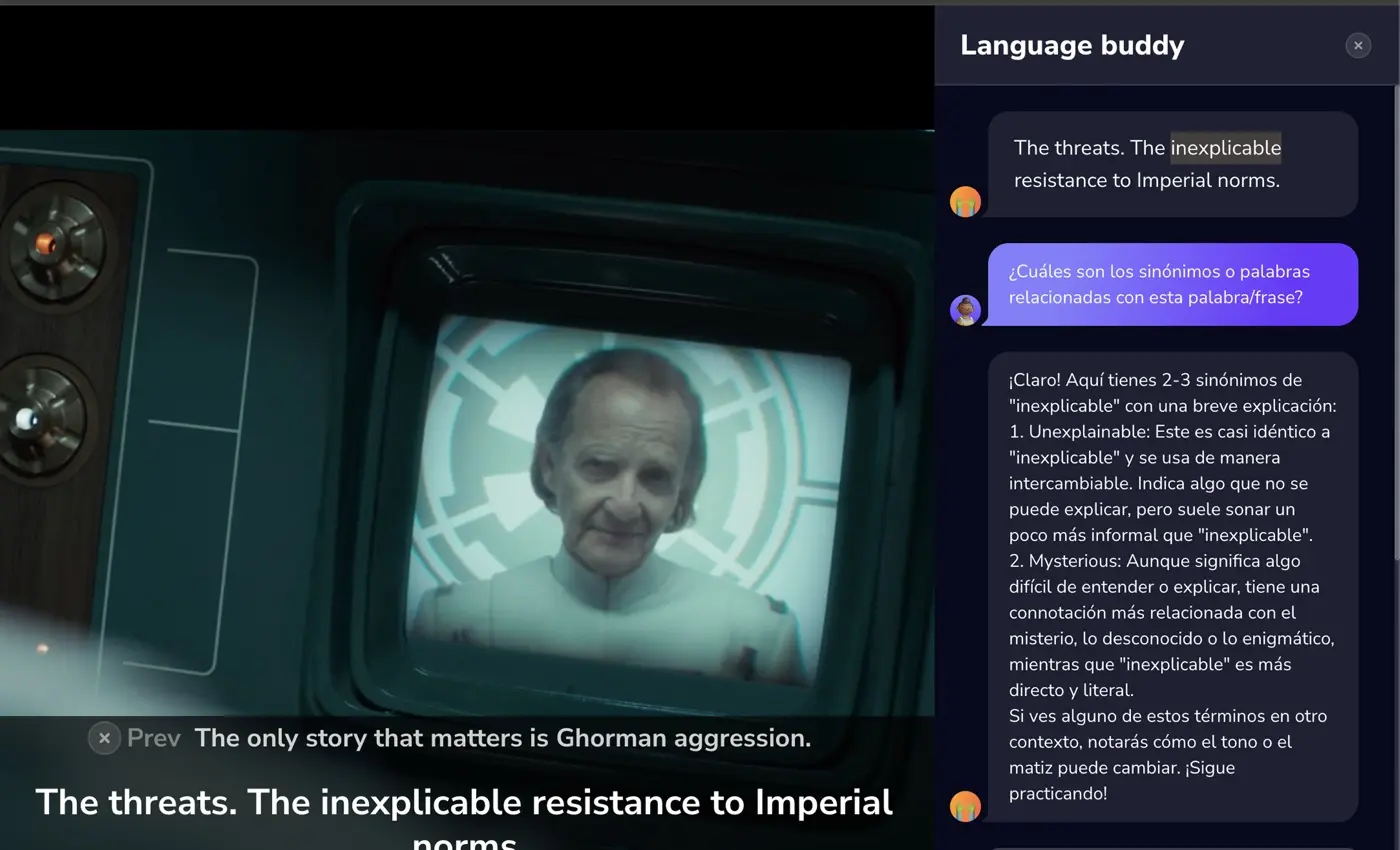
How to ask AI Language Buddy
Install InterSub
Add the free InterSub extension to Google Chrome, Microsoft Edge or Firefox. Links for every browser are on the install page.
Choose your languages
Right after installation InterSub asks which language to translate from and which to translate into. Dual subtitles are on by default.
Pick a word and click the Magic button
Hover over a word in the subtitles, or double-click a word on a website. In the pop-up with the translation, click the Magic button: AI Language Buddy opens with the word and its sentence already there.
What the sentence explainer does
The word first, in its context. Buddy starts with the word you picked and explains what it means in this sentence, not every meaning a dictionary has.
Then the whole sentence. Ask Buddy to explain this sentence, and it goes through the whole line: the phrase, the idiom, the joke that doesn't translate word by word.
A slang translator for real speech. People in series and on YouTube rarely talk the way textbooks do. Buddy translates slang into plain words, so “gutted” or “no cap” stops being a mystery.
Grammar and your own questions. Ask why the tense or word order works this way, which synonyms fit or what a cultural reference is about, or type any question of your own.
In videos and on websites. Buddy works on a subtitle line on YouTube, Netflix, Udemy and other platforms, and on ordinary websites: an article, a Reddit thread, the comments.
Saved to your Wordbook. Save a dictionary-style definition from the chat straight to your Wordbook, next to the words you looked up, and practice them later.
The translation itself comes from the pop-up dictionary; dual subtitles and other tools are on the features page.
That's so good, very convenient
Frequently asked questions
How is it different from pasting text into a sentence explainer?
You don't copy a line and type “explain what this means”. Buddy already has the word and the sentence you were reading or hearing, so the answer fits this scene or this page, and the video stays paused while you read.
Can it explain British slang?
Yes. Watching a British series? Pick the word, and Buddy works as a British slang translator: it explains what the word means in this line and how to say it in plain English. The same goes for American slang and internet slang.
Does it work only in videos?
No. Buddy works on a subtitle line and on ordinary websites in Google Chrome, Microsoft Edge and Firefox. On a website, double-click a word or select it, then click the Magic button.
Is AI Language Buddy free?
Buddy works on every plan, including the free one: each question uses the same allowance as a word lookup. The free plan has 15 lookups a month and starts with a 14-day Premium trial; Pay-as-you-go packs of 50 to 500 lookups, which also cover Buddy requests, start at $1.49. See plans and prices.
What does it run on?
AI Language Buddy runs on ChatGPT, so it can explain meaning, not just translate words.
More questions about InterSub? See all answers in our FAQ.
Other cases
Pop-up dictionary
Hover over a word in the subtitles or select it on a website to see its meaning in context.
AI subtitle translator
No subtitles in your language? Get them translated live while you watch.
Vocabulary trainer
Practice the words you looked up in our Telegram bot, with spaced repetition.
Netflix dual subtitles
Watch Netflix series and films with two subtitle lines and a pop-up dictionary.
YouTube dual subtitles
Lectures, tutorials and talks on YouTube with two subtitle lines and a pop-up dictionary.
Learn Japanese with anime on Crunchyroll
Watch Crunchyroll anime with Japanese and English subtitles at once.
Get Started with InterSub
InterSub is a free browser extension for Chrome, Edge and Firefox. Install it today and get any sentence explained where you read and watch.