

How to sync your InterSub Wordbook with Anki
InterSub connects to Anki like an Anki Chrome extension. You watch Netflix, Prime Video or YouTube, or take a course on Coursera or Udemy, with dual subtitles and look up words in the pop-up dictionary. Your Wordbook, a vocabulary builder that fills itself while you watch, keeps them. Star the words you want to learn, and after a sync they appear as flashcards in Anki on your computer or phone, so you can review vocabulary anywhere.
Before you start
- Only starred words sync. InterSub saves every word you look up; mark the ones you want to learn with a star in your Wordbook.
- Anki sync comes with paid plans. It is part of Pay-as-you-go and Premium, and you can try it during the 14-day Premium trial. See plans and prices.
- New words take a few minutes. A word you have just starred can take a little while to be ready for sync.
- You log in to Anki with your InterSub email and password. If you signed in to InterSub with Google, Facebook or Chrome, set a password first (see below).
Set up Anki on desktop
- Open Anki, click Tools → Preferences and switch to the Syncing tab.
- In the Self-hosted sync server field, enter https://app.intersub.cc.
- Click Close to save the settings.
- Click Sync in the top-right corner. When the “Account Required” dialog appears, enter your InterSub email and password.
Set up AnkiDroid on Android
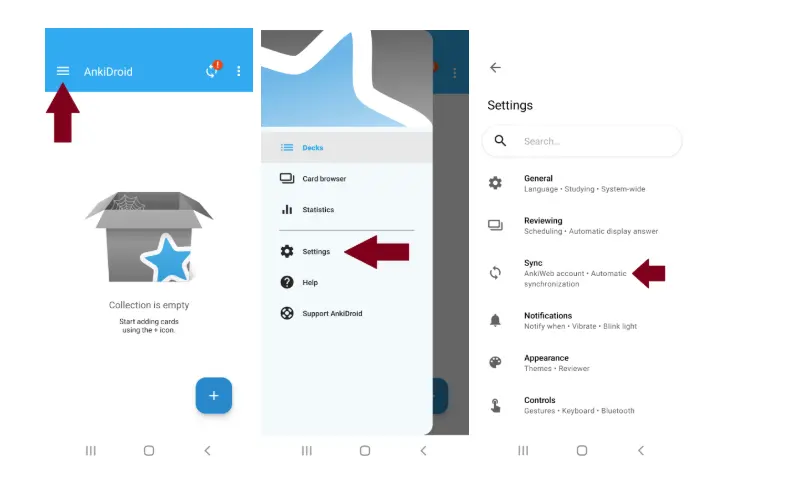
- Open the Anki app, tap the ≡ menu in the top-left corner and go to Settings → Sync.
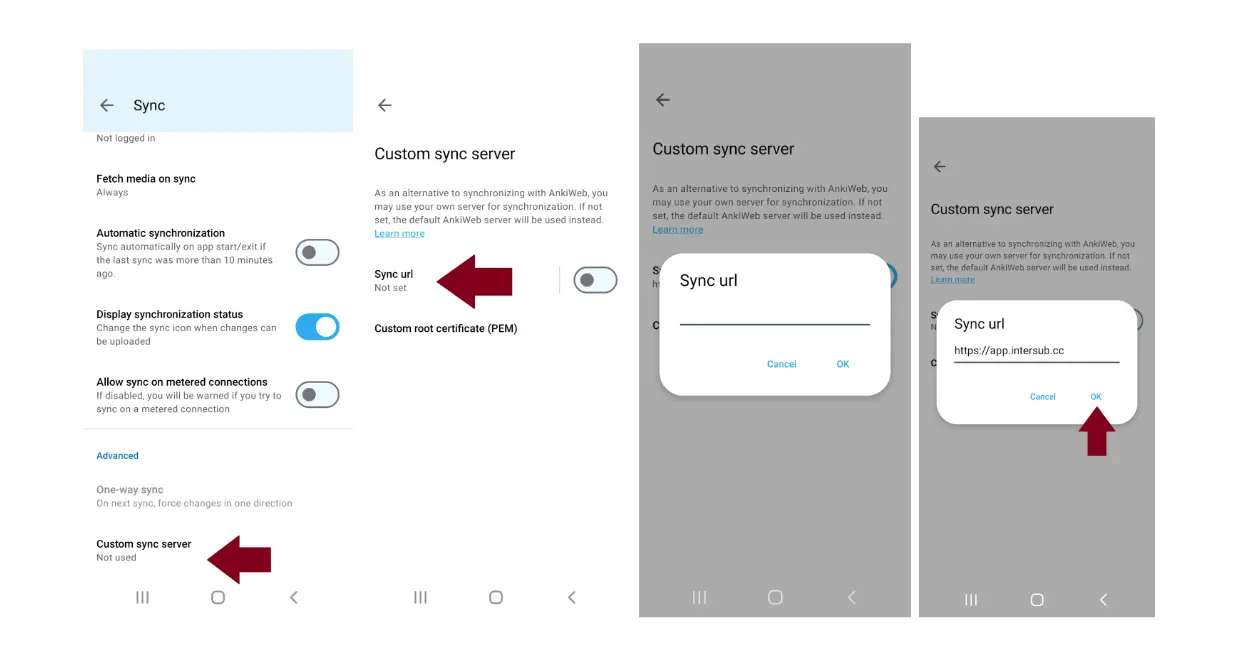
- Scroll to the bottom, tap Custom sync server, then Sync URL. Enter https://app.intersub.cc and tap OK.
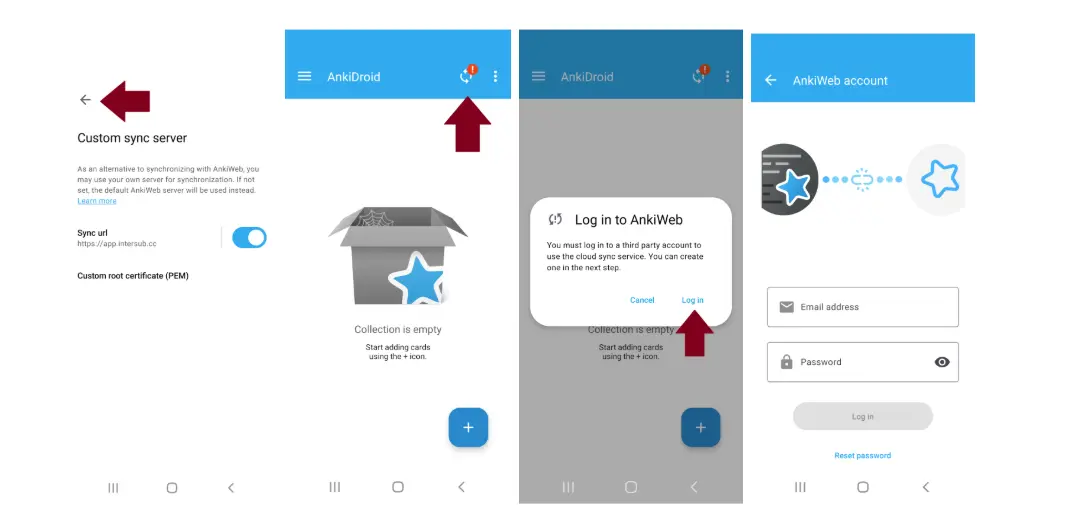
- Tap the back arrow three times to return to the main screen, then tap the sync button in the top-right corner.
- In the “Log in to AnkiWeb” dialog, tap Log in and enter your InterSub email and password.
Set up AnkiMobile on iPhone and iPad
AnkiMobile, the Anki app for iPhone and iPad, can connect to the InterSub sync server too. In its sync settings, set the custom sync server to https://app.intersub.cc, then sync and log in with your InterSub email and password. Your starred words arrive in the same InterSub deck.
No password? Set one in your profile
If you signed in to InterSub with Google, Facebook or automatic Chrome login, you need a password for Anki:
- Open your profile at app.intersub.cc/user-profile.
- Copy your email address and make sure there are no spaces before or after it.
- Click the pencil icon and set a password. Forgot it? Log out and use “Forgot password?” on the login page.
Fix a sync conflict
If Anki says “There is a conflict between decks on this device and AnkiWeb”, choose Download from AnkiWeb. Your starred words sync, and your existing decks stay as they are.
After the first sync
All your starred words appear in the InterSub deck in Anki. Every next sync adds the words you have starred since to the same deck.
Now the words from Netflix, a Udemy course or an anime on Crunchyroll come back as flashcards when you are about to forget them, and you learn new words wherever you have Anki. Prefer to practice in a chat? Your Wordbook also works with our Telegram bot.