

A vocabulary trainer for the words you saved while watching
Words you look up with InterSub on YouTube, Netflix, Udemy and other platforms, or on any website, go to your Wordbook. The InterSub Words bot in Telegram is a vocabulary trainer for exactly these words: short sessions, your own example sentences checked by an AI tutor, and spaced repetition so they stay with you.
How to start
Save words with InterSub
Install the InterSub extension for Google Chrome, Microsoft Edge or Firefox from the install page and choose your languages. Hover over words in the subtitles or select them on websites: they are saved to your Wordbook.
Connect the bot
Open InterSub Words in Telegram. In the bot's onboarding, pick InterSub as the word source, take a photo of the QR code in your InterSub profile and send it to the bot as a picture.
Practice a few minutes a day
The bot gives you short sessions with your words and reminds you when it's time to repeat them.
What the vocabulary trainer does
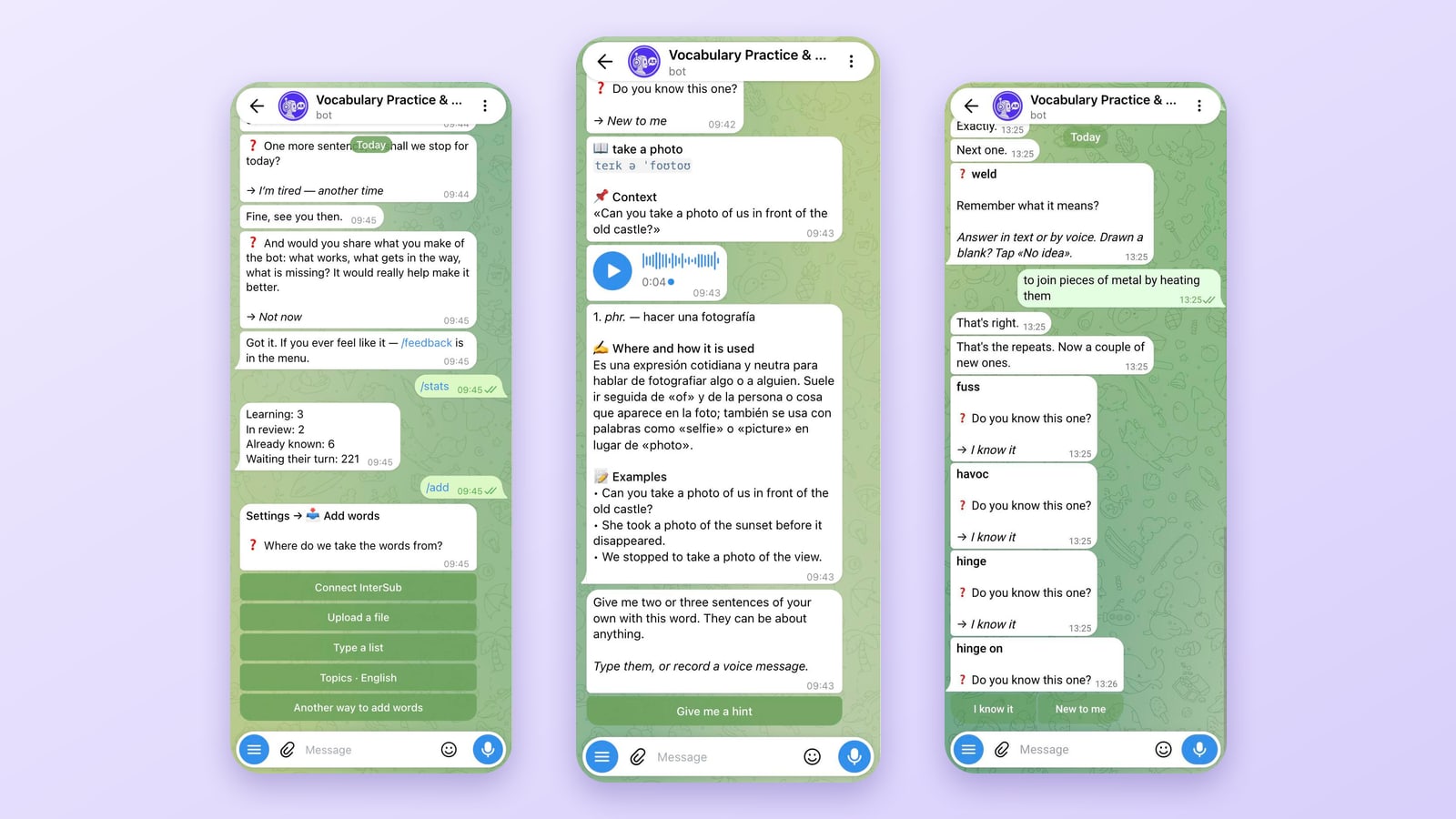
Short sessions. A session goes word by word and starts with a simple question: do you know this one?
A card for every word. Translation, usage and examples in context, so you learn new words the way they are actually used.
Your own examples, checked by an AI tutor. Write a sentence with the new word. The AI tutor reviews it, points out mistakes and answers any language question you have.
Spaced repetition and reminders. Then the word moves to spaced repetition: the bot brings it back on a schedule, just before you would forget it. It works like a spaced repetition app, but inside Telegram.
Answer by voice. No time to type? You can answer the bot with a voice message.
Not only words from videos. Add your own words from a file or a list, or pick topic lists (English only for now).
Prefer flashcards on your computer? Words you star in your Wordbook also sync to Anki.
I really love this app, thank you so much!
Frequently asked questions
How do my InterSub words get into the bot?
In the bot's onboarding, pick InterSub as the word source, take a photo of the QR code in your InterSub profile and send it to the bot as a picture. The bot does not connect to YouTube or Netflix itself: it takes the words you saved with the InterSub extension.
How many saved words can I import?
5 words from your Wordbook on the free InterSub plan, unlimited on any paid plan. See plans and prices.
Which languages can I practice?
English, German, Spanish, French, Japanese, Chinese, Russian, Korean, Czech and Polish.
Do I need to install a vocab trainer app?
No. The vocab trainer is a Telegram bot, so it works wherever you have Telegram, on your phone or your computer.
Can I practice in Anki instead?
Yes. Words you star in your Wordbook sync to Anki on desktop and mobile; see the Anki page.
More questions about InterSub? See all answers in our FAQ.
Other cases
Pop-up dictionary
Hover over a word in the subtitles or select it on a website to see its meaning in context.
AI sentence explainer
AI Language Buddy explains a word in context, then the whole sentence, slang and grammar.
AI subtitle translator
No subtitles in your language? Get them translated live while you watch.
Anki Chrome extension
Words you star in your Wordbook sync to Anki as flashcards.
YouTube dual subtitles
Lectures, tutorials and talks on YouTube with two subtitle lines and a pop-up dictionary.
Netflix dual subtitles
Watch Netflix series and films with two subtitle lines and a pop-up dictionary.
Start practicing your words
Open InterSub Words in Telegram. No saved words yet? Install the InterSub extension for Chrome, Edge or Firefox first, or start with your own words and topic lists.